
Hermes Agent Setup
This guide describes how to configure Hermes Agent to use Aiberm as its model provider. Hermes Agent is an open-source AI agent developed by Nous Research that runs in the terminal and integrates with messaging platforms including Telegram, Discord, Slack, WhatsApp, and Signal.
Because Aiberm exposes an OpenAI-compatible /v1 API, it can be registered as a custom provider in Hermes Agent without installing any plugin or modifying source code. Once configured, a single API key gives you access to all models available on Aiberm, including Claude, GPT, Gemini, DeepSeek, Kimi, MiniMax, GLM, and Grok.
Prerequisites
- An Aiberm account (Sign up)
- An Aiberm API key (Get your key)
- Hermes Agent installed — see the official installation guide
Quick install (Linux / macOS / WSL2):
curl -fsSL https://raw.githubusercontent.com/NousResearch/hermes-agent/main/scripts/install.sh | bashConfigure Aiberm as a Provider
Hermes Agent stores its configuration at ~/.hermes/config.yaml. Open the file and add an aiberm entry under the providers: section.
If you’re not comfortable with command-line editors like Vim, you can open the configuration file using your operating system’s built-in editor:
- macOS: Open Finder, press
Shift + Command + G, enter~/.hermesin the dialog that appears, and press Return. Locate theconfig.yamlfile, right-click it, and select Open With → TextEdit.- Windows: Open File Explorer, type
%USERPROFILE%\.hermesin the address bar, and press Enter. Right-clickconfig.yamland select Open with → Notepad.After editing, remember to save the file (
Command + Son macOS,Ctrl + Son Windows), then proceed to the restart step described below.
model:
  default: claude-sonnet-4-6
  provider: aiberm

providers:
  aiberm:
    base_url: https://aiberm.com/v1
    api_key: sk-your-aiberm-api-key
    type: openai
    default_model: claude-sonnet-4-6
    models:
      # Claude
      - claude-opus-4-7
      - claude-opus-4-6
      - claude-opus-4-6-thinking
      - claude-opus-4-5-20251101
      - claude-opus-4-5-20251101-thinking
      - claude-sonnet-4-6
      - claude-sonnet-4-6-thinking
      - claude-sonnet-4-5-20250929
      - claude-sonnet-4-5-20250929-thinking
      - claude-haiku-4-5-20251001
      - claude-haiku-4-5-20251001-thinking
      # Claude (anthropic/ prefix)
      - anthropic/claude-opus-4.7
      - anthropic/claude-opus-4.6
      - anthropic/claude-opus-4.6:thinking
      - anthropic/claude-opus-4.5
      - anthropic/claude-opus-4.5:thinking
      - anthropic/claude-opus
      - anthropic/claude-sonnet-4.6
      - anthropic/claude-sonnet-4.6:thinking
      - anthropic/claude-sonnet-4.5
      - anthropic/claude-sonnet-4.5:thinking
      - anthropic/claude-sonnet
      - anthropic/claude-haiku-4.5
      - anthropic/claude-haiku-4.5:thinking
      # GPT / OpenAI
      - gpt-5.4
      - gpt-5.4-xhigh
      - gpt-5.4-mini
      - gpt-5.3-codex
      - gpt-5.3-codex-xhigh
      - gpt-5.2
      - gpt-5.2-chat-latest
      - gpt-5.2-codex
      - gpt-5.1
      - gpt-5.1-codex
      - gpt-5.1-codex-max
      - gpt-5
      - gpt-5-mini
      - gpt-5-nano
      - o3-mini
      - gpt-4.1
      - gpt-4.1-mini
      - gpt-4.1-nano
      - gpt-4o
      - gpt-4o-mini
      # GPT / OpenAI (openai/ prefix)
      - openai/gpt-5.4
      - openai/gpt-5.4-mini
      - openai/gpt-5.3-codex
      - openai/gpt-5.2
      - openai/gpt-5.2-chat
      - openai/gpt-5.2-codex
      - openai/gpt-5.1
      - openai/gpt-5.1-codex
      - openai/gpt-5.1-codex-max
      - openai/gpt-5
      - openai/gpt-5-codex
      - openai/gpt-5-mini
      - openai/gpt-5-nano
      - openai/gpt-4.1
      - openai/gpt-4.1-mini
      - openai/gpt-4.1-nano
      - openai/gpt-4o
      - openai/gpt-4o-mini
      - openai/o3-mini
      # Gemini
      - gemini-3.1-pro-preview
      - gemini-3.1-pro-preview-thinking
      - gemini-3.1-flash-lite-preview
      - gemini-3.1-flash-image-preview
      - gemini-3-pro-preview
      - gemini-3-pro-preview-thinking
      - gemini-3-pro-image-preview
      - gemini-3-flash-preview
      - gemini-2.5-pro
      - gemini-2.5-flash
      - gemini-2.5-flash-image
      # Gemini (google/ prefix)
      - google/gemini-3.1-pro
      - google/gemini-3.1-flash-lite
      - google/gemini-3-pro
      - google/gemini-3-pro-mcpmark
      - google/gemini-3-flash
      - google/gemini-2.5-pro
      - google/gemini-2.5-flash
      # DeepSeek
      - deepseek-v3.2
      - deepseek-v3.2-exp
      - deepseek-r1-0528
      - deepseek-ocr
      - deepseek/deepseek-v3.2
      - deepseek/deepseek-v3.2-exp
      - deepseek/deepseek-v3.2-exp-thinking
      - deepseek/deepseek-r1
      - deepseek/deepseek-r1-0528
      # Grok (xAI)
      - grok-code-fast-1
      - grok-4-1-fast-reasoning
      - grok-4-1-fast-non-reasoning
      - grok-4.20-beta-0309-reasoning
      - grok-4.20-beta-0309-non-reasoning
      - x-ai/grok-4.1-fast
      - x-ai/grok-code-fast-1
      # Kimi / Moonshot
      - Kimi-K2.6
      - kimi-k2.5-thinking
      - kimi-k2.5
      # MiniMax
      - MiniMax-M2.7
      - minimax-m2.5
      - minimax-m2.1
      - minimax/minimax-m2.7
      - minimax/minimax-m2.5
      - minimax/minimax-m2.1
      # GLM (Zhipu)
      - glm-5.1
      - glm-5
      - glm-5-turbo
      # Qwen (Alibaba)
      - qwen3.6-plus
      - qwen3.5-plus
      - qwen3.5-397b-a17b
      # MiMo (Xiaomi)
      - mimo-v2-pro
      - mimo-v2-omni
      - mimo-v2-flash
- xiaomi/mimo-v2-flashTip: The list above covers the majority of models Aiberm currently provides, which is quite extensive. We recommend keeping only the models you actually use and removing the rest.
Field Reference
| Field | Required | Description |
|---|---|---|
base_url | Yes | Aiberm’s OpenAI-compatible endpoint. Set to https://aiberm.com/v1. |
api_key | Yes | Your Aiberm API key, available from the console. |
type | Yes | Protocol type. Set to openai — Aiberm conforms to the OpenAI Chat Completions specification. |
default_model | Yes | The model used when no explicit model is specified. |
models | Recommended | The list of models displayed in the /model picker. Hermes only shows entries present in this list (plus default_model). If omitted, the picker displays a single button. |
The top-level model: section designates the active provider and default model. If you were previously using another provider, set provider: to aiberm and set default: to any model listed in the models: block.
Usage
After updating the configuration, restart Hermes (CLI: exit and re-run hermes; gateway: hermes gateway restart).
In the terminal (CLI):
/modelHermes opens an interactive model picker. Select Aiberm, then choose the desired model. You may also switch directly:
/model claude-opus-4-7
/model gpt-5.4 --global
Adding --global persists the change to config.yaml; omitting it applies the change only to the current session.
In Telegram, Discord, Slack, or WhatsApp:
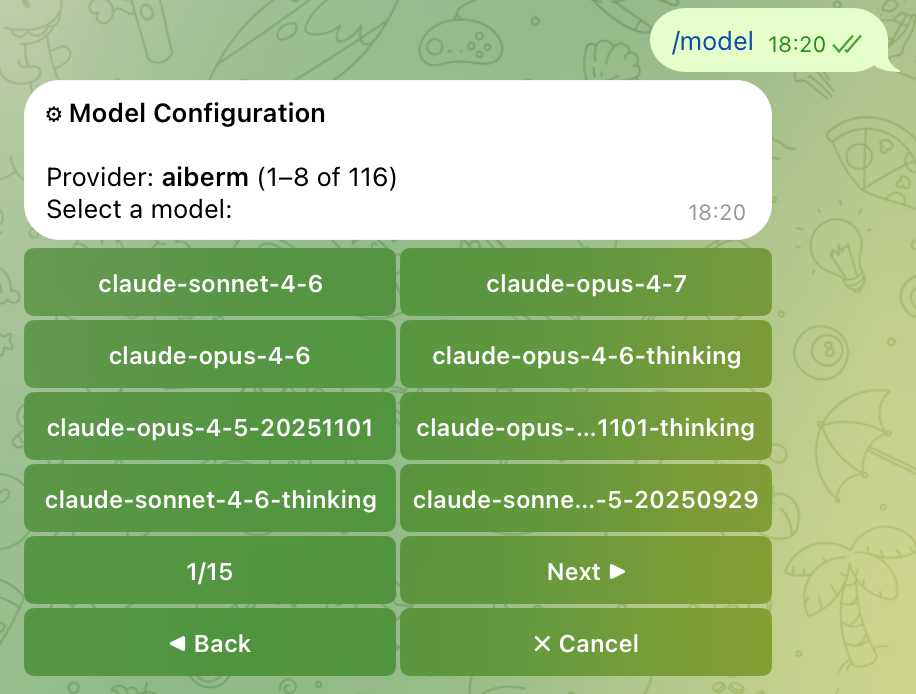
Send /model to your bot. It returns an inline keyboard listing every provider for which credentials are configured. Select Aiberm to view the paginated model list (8 per page, with Prev / Next navigation), then tap a model to switch.
Viewing the Complete Model Catalog
The models: list above is a curated subset. To view every model currently served by Aiberm, query the API directly:
curl -H "Authorization: Bearer sk-your-aiberm-api-key" \
     https://aiberm.com/v1/models | jq -r '.data[].id'
Add any model IDs you want to use to your models: block and restart Hermes. They will then appear in the /model picker.
Using Environment Variables (Optional)
If you prefer not to store the API key in config.yaml, you can read it from an environment variable. Set:
export AIBERM_API_KEY=sk-your-aiberm-api-keyThen reference it in config.yaml via key_env:
providers:
  aiberm:
    base_url: https://aiberm.com/v1
    key_env: AIBERM_API_KEY
    type: openai
    default_model: claude-sonnet-4-6
Troubleshooting
/model only shows a single button for Aiberm
The providers.aiberm block is missing the models: list. The Hermes picker only paginates when more than 8 models are configured. Add the curated list shown above and restart Hermes.
401 Unauthorized
- Verify the API key at the Aiberm console.
- Confirm the key is placed under
providers.aiberm.api_key, not at the top level of the configuration.
Model Not Found
Aiberm’s model catalog evolves over time; a model you had listed may have been renamed or deprecated. Query /v1/models again (see above) and update your models: list accordingly.
How to verify the configuration is loaded
hermes doctorThis command prints a diagnostic report that includes the currently active provider and model.